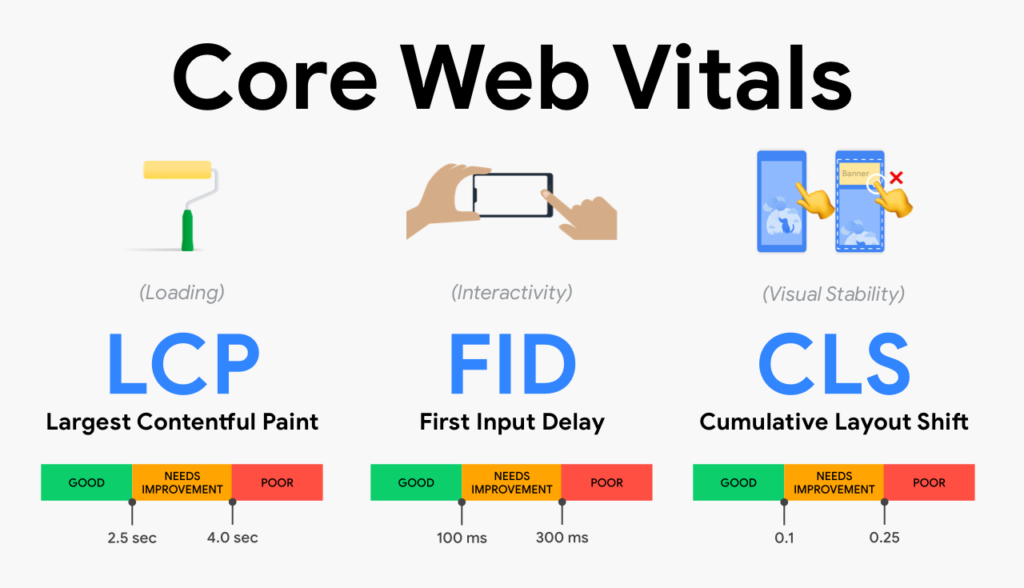
Core Web Vitals are a set of performance metrics introduced by Google to measure user experience on websites. Improving these metrics can lead to better rankings, faster load times, and improved engagement.
This beginner guide explains how to improve Core Web Vitals step by step without advanced technical skills.
What Are Core Web Vitals?
Core Web Vitals focus on three key aspects of user experience:
- LCP (Largest Contentful Paint) – Loading speed
- CLS (Cumulative Layout Shift) – Visual stability
- INP (Interaction to Next Paint) – Interactivity
Why Core Web Vitals Matter for SEO
- Direct Google ranking factor
- Improves user experience
- Reduces bounce rate
- Increases engagement
How to Improve Core Web Vitals Step by Step
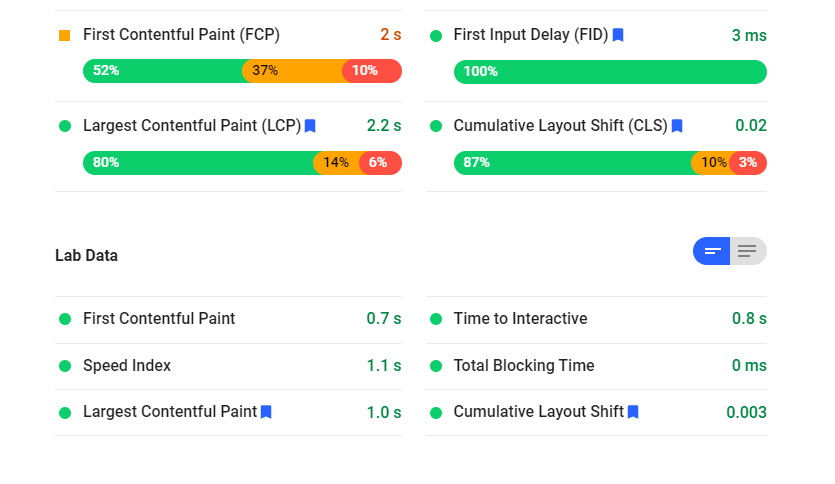
1. Improve Largest Contentful Paint (LCP)
Optimize images, use fast hosting, and reduce server response time.
2. Reduce Cumulative Layout Shift (CLS)
Always define image dimensions and avoid sudden layout changes.
3. Improve Interaction to Next Paint (INP)
Reduce heavy scripts and improve JavaScript efficiency.
4. Optimize Images
Compress images and use modern formats.
5. Use Browser Caching
Enable caching to improve repeat visits.
6. Reduce Unused Scripts
Remove unnecessary plugins and scripts.
7. Use a Content Delivery Network (CDN)
CDNs deliver content faster to users worldwide.
8. Test Regularly
Monitor performance using PageSpeed Insights.
Common Core Web Vitals Mistakes
- Ignoring mobile performance
- Overusing heavy themes
- Adding too many scripts
Final Thoughts
Improving Core Web Vitals doesn’t require advanced technical skills. By focusing on speed, stability, and interactivity, you can significantly enhance user experience and SEO performance.
Consistent improvements lead to long-term ranking benefits.