
A sitemap is a file that lists all important pages on your website. It helps search engines understand your site structure and find new or updated pages faster.
This beginner guide explains how to create a sitemap for your website and submit it to search engines.
What Is a Sitemap?
A sitemap is a roadmap of your website that helps search engines crawl and index your content efficiently.
Why a Sitemap Is Important
- Helps search engines discover pages
- Improves indexing speed
- Supports SEO performance
- Useful for large or new websites
Types of Sitemaps
- XML Sitemap: For search engines
- HTML Sitemap: For users
Step-by-Step Guide to Create a Sitemap
1. Create an XML Sitemap Automatically
Most websites use SEO plugins or built-in CMS features to generate sitemaps automatically.
2. Review Sitemap URLs
Ensure only important and indexable pages are included.
3. Exclude Unnecessary Pages
Remove admin, duplicate, or low-value pages if needed.
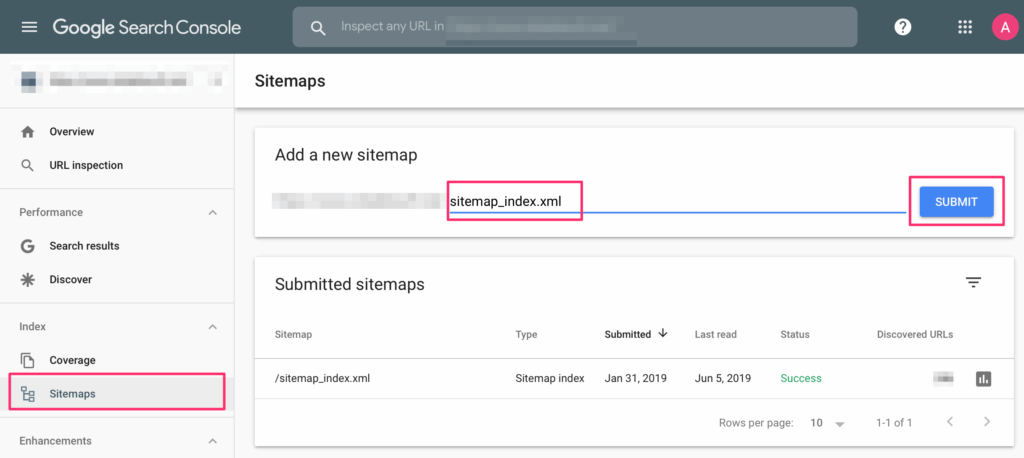
4. Submit Sitemap to Search Engines
Submit your sitemap using Google Search Console.
5. Monitor Sitemap Status
Check for errors or warnings regularly.
How Often Should You Update a Sitemap?
- Automatically (recommended)
- After publishing new content
- After deleting pages
Common Sitemap Mistakes
- Including non-indexable URLs
- Forgetting to submit sitemap
- Not updating sitemap
Final Thoughts
Creating a sitemap is one of the easiest SEO tasks with long-term benefits. It helps search engines understand your website structure and index content efficiently.
Make sure your sitemap is accurate, clean, and regularly monitored.